How to Redeem BGT Coins for Google Play Gift Codes
Complete guide — earn coins, redeem codes, buy BGMI UC
What Is the BGMITools Redeem System?
The BGMITools Redeem page is where your earned BGT Coins become real Google Play gift codes.
After completing daily tasks on the Earn page — watching ads, referring friends, spinning the wheel,
and sharing on social media — you accumulate BGT Coins. Once you reach a reward tier, visit this page,
select your code value, and your Google Play code is delivered instantly to your dashboard.
How to Use a Google Play Code for BGMI UC
Once you receive your Google Play gift code from BGMITools, open the Google Play Store app on your Android phone.
Tap your profile icon in the top right, go to Payments and Subscriptions, tap Redeem Gift Code,
enter your 16-digit code, and tap Redeem. Your balance is added instantly.
Open BGMI, go to the UC shop, select any UC pack, and choose Google Play balance as your payment method.
UC is credited to your account within seconds.
Why Google Play Codes Instead of Direct UC?
Google Play gift codes work across all Android devices and are accepted directly in BGMI without any
third-party payment gateway. They are safer than sharing UPI details, work for students without bank accounts,
and can be used for any Google Play purchase — not just BGMI UC.
Are Redeemed Codes Safe and Permanent?
Yes. Every Google Play code you redeem on BGMITools is saved permanently to your dashboard under My Codes.
You can view and copy your codes anytime — they never disappear. Codes are valid for one year from issue date
and are for one-time use only on Google Play India accounts.
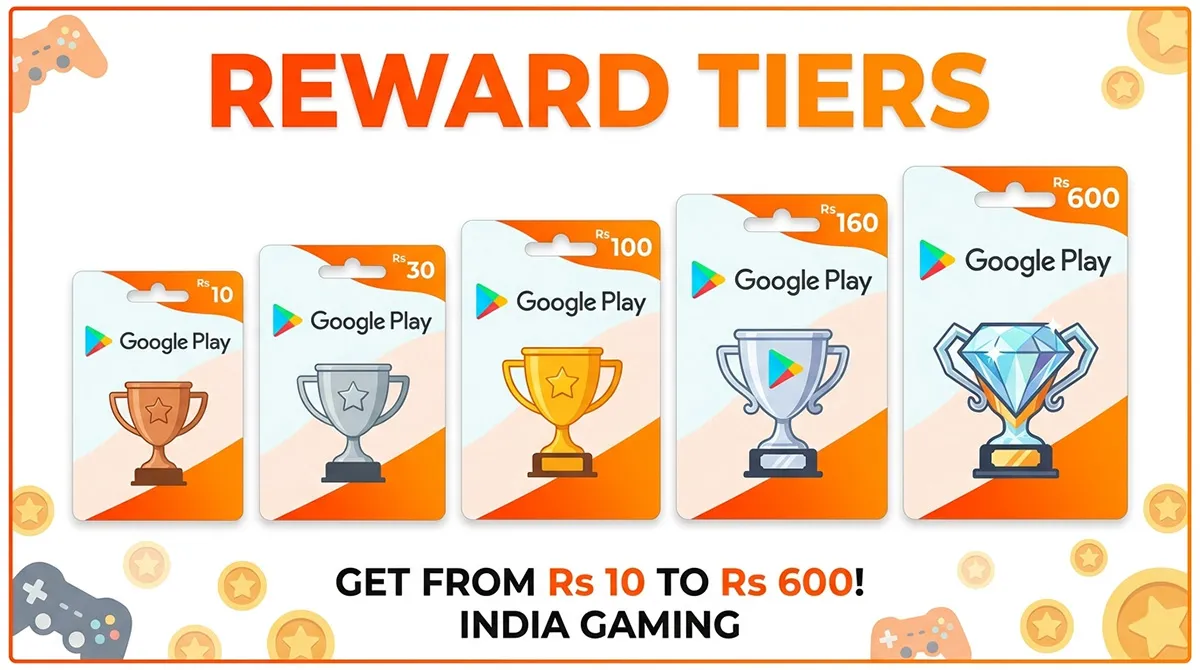
Reward Tiers
Starter — 100 Coins = ₹10
Your first Google Play code. Earn it in about 10 days of daily tasks.
Bronze — 220 Coins = ₹30
Good for small in-game purchases. Reach it faster by referring friends.
Silver — 450 Coins = ₹100
Most popular tier. Enough for a UC top-up in BGMI. Takes about 30–45 days.
Gold — 800 Coins = ₹160
Buy UC plus a skin or emote. Use referrals and social tasks to reach faster.
Legend — 1200 Coins = ₹600
Biggest reward. Enough for Royale Pass or a major UC top-up.
Step-by-Step: Redeem BGT Coins
Step 1: Earn BGT Coins
Complete tasks on the Earn page — ads, spin, referrals, and social sharing.
Step 2: Choose Your Tier
Select ₹10, ₹30, ₹100, ₹160, or ₹600 Google Play code.
Step 3: Get Your Code
Your code is delivered instantly and saved permanently in your dashboard.
Step 4: Buy BGMI UC
Redeem your code in Play Store and use the balance to purchase UC in BGMI.
Wanted to earn more – Free Fire Earn Coins
Frequently Asked Questions
How do I redeem BGT Coins for a Google Play code?
Log in to BGMITools, go to the Redeem page, choose your reward tier, click Redeem,
and confirm. Your code is shown instantly and saved in your dashboard.
How do I use my Google Play code to buy BGMI UC?
Open Google Play Store, go to Payments and Subscriptions, tap Redeem Gift Code,
enter your code, and redeem it. Then use the balance inside BGMI to buy UC.
How long is my Google Play code valid?
Codes are valid for 1 year and saved permanently in your dashboard.
Each code can be used only once.
Can I redeem multiple Google Play codes?
Yes. You can redeem one code per hour and there is no total limit.
What can I buy with Google Play balance?
You can buy BGMI UC, Free Fire diamonds, apps, games, subscriptions,
movies, books, and more on the Play Store.
Why can’t I see my coin balance?
You must be logged in to see your balance. Register or log in on bgmitools.com.
Do I need to download an app?
No. Everything works directly in your browser on any device.
Don’t have enough coins yet?

BGMI Clan Name Ideas 500+ Unique, Stylish & Pro Names With Symbols
500+ BGMI clan name ideas for 2026 — aggressive, stylish, desi, funny, pro esports tags. Copy-paste ready with symbols. Includes naming rules,…
Best BGMI Clan Names 2026: Stylish, Pro & Unique Squad IDs
350+ best BGMI clan names for 2026. Stylish, pro, Hindi, funny, and unique clan names. Clan tags, symbols, and how to create…
BMPS Overview 2026
BMPS 2026 is live — 64 teams, ₹2 crore prize pool, EWC 2026 slot at stake. Full schedule, teams, format, live standings…

BGMI Official: All Official Links, Downloads
Every official BGMI link in one place—download, website, Instagram (8M followers), YouTube, support, redeem portal. Verified for India 2026. Avoid fake sites.