

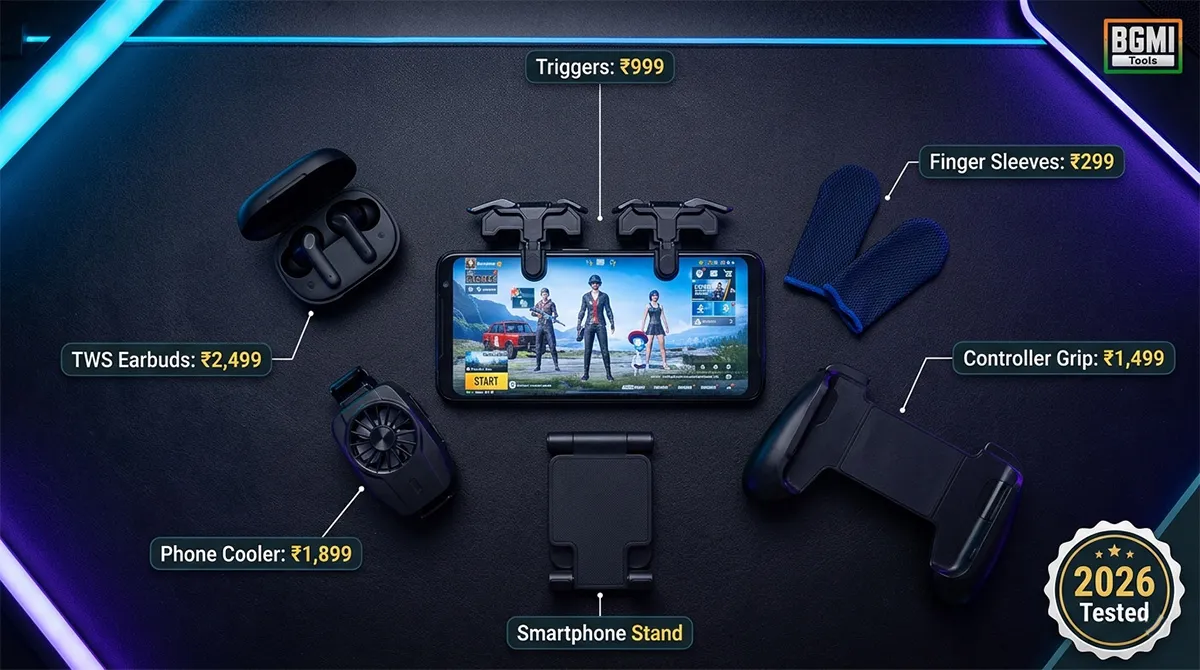
Best BGMI Gaming Accessories for Mobile Users 2026: Triggers, Buds & More
You spot an enemy in the final circle. Your thumb, slick with sweat, slides off the fire button. You hear footsteps to your left, but your ₹800 earbuds can’t tell you if they’re above or below. You reposition your grip, the phone slips slightly, and in that half-second of adjustment — you’re dead. Back to the lobby.
Accessories don’t just make BGMI more comfortable. They make you faster, more accurate, and more aware. A good set of triggers shaves 50 milliseconds off your reaction time. Low-latency earbuds let you pinpoint enemy positions before they round the corner. A simple finger sleeve prevents the sweat-smudge deaths that end promising games.
But the Indian market is flooded with garbage. For every SpinBot NinjaX that actually improves your game , there are three SKYCELL triggers that break on the first use . For every pair of 30ms latency earbuds that sync audio perfectly , there are five “gaming earbuds” with 150ms of hidden delay that make footsteps sound like they’re coming from everywhere at once.
This guide covers every BGMI accessory category in 2026 — triggers, grips, audio, coolers, and finger sleeves — with specific product recommendations that real players have tested and verified. No sponsored picks. No affiliate filler. Just what actually works.
Why BGMI Accessories Matter More in 2026
Before the specific recommendations, understand what changed. The BGMI 4.3 update in March 2026 expanded weapon variety and added a performance-based loot tier system that rewards aggressive, precise play . The 4.2 update earlier this year buffed 7.62mm weapons, increasing time-to-kill speed and making every millisecond of reaction time more valuable .
These gameplay changes mean that the gap between a bare-thumb player and one using proper accessories has widened. A trigger user can ADS and fire 50ms faster than a thumb-only player. That 50ms is now the difference between winning and losing close-range encounters with the buffed AKM.
Simultaneously, the accessory market has matured. In 2023, “gaming triggers” meant cheap plastic clips that broke in a week. In 2026, capacitive conduction triggers offer near-instant response without mechanical failure points. TWS earbuds now deliver 30ms latency — a threshold where the human brain can no longer perceive audio delay . The technology has caught up to what competitive BGMI demands.
Category 1: Gaming Triggers — The Reaction Time Advantage
Triggers are physical button attachments that clip onto your phone and map to on-screen fire and ADS buttons. Your index fingers press the triggers while your thumbs handle movement and camera — effectively giving you a 4-finger claw experience without contorting your hands.
What to Look for in BGMI Triggers
Capacitive vs. Mechanical: Capacitive triggers (like SpinBot BattleMods NinjaX ) use conductive pads that register instantly. Mechanical triggers have a physical click mechanism that adds 5-10ms of travel time. For competitive BGMI, capacitive is superior — but also more expensive.
Build Quality: The most common complaint across Amazon India reviews for budget triggers is breakage within the first week . Look for triggers with metal contact points, not all-plastic construction. SpinBot triggers claim “1 million click” durability , but real-world reviews suggest 3-6 months of heavy use before any degradation.
Fit Compatibility: Phone thickness varies enormously. Triggers with adjustable clip widths fit more devices but can loosen over time. Fixed-width triggers are more stable but may not fit thick phone cases.
Recommended Triggers for BGMI 2026
| Product | Price | Type | Durability | Best For |
|---|---|---|---|---|
| SpinBot BattleMods NinjaX | ₹799 | Capacitive | 3-6 months heavy use | Competitive players wanting fastest response |
| Gamesir F4 Falcon | ₹1,499 | Mechanical + Grip combo | 6+ months | Players wanting grip + trigger in one device |
| Betop G1S | ₹2,299 | Mechanical + Foldable | 6+ months | Travelers, compact setup |
| Basic clip triggers | ₹300-500 | Mechanical | Highly variable | Casual players testing triggers for first time |
What real players say about SpinBot NinjaX: “As a passionate gamer, the responsiveness is simply unmatched; I noticed an immediate improvement in my gameplay, especially during fast-paced action sequences” . However, multiple reviews also note that one trigger in the pair can stop working after 2-3 months of intensive use — this is the trade-off at this price point.
What to avoid: The SKYCELL gaming triggers (₹200-400 range) have overwhelming negative reviews citing “broken on first use,” triggers arriving already damaged, screws that don’t tighten properly, and poor fit on phones with cases. At this price, you’re gambling — and usually losing.
Critical Note on Trigger Bans: As of May 2026, physical trigger attachments are NOT banned in BGMI . They map to on-screen buttons and do not modify game files. However, some community-run tournaments have begun restricting physical triggers in their rule sets. Always check tournament-specific rules before competing. For regular ranked and classic matches, triggers are fair play.
Category 2: Controller Grips — Stability and Endurance
Grips are different from triggers — they focus on holding your phone in a console-controller position, reducing hand fatigue during 2+ hour sessions. Some include built-in triggers. Others are purely ergonomic.
Why Grips Help in BGMI
A 6.7-inch phone weighs roughly 200 grams. Holding it in a claw grip for an hour creates significant strain on your wrists and fingers. A controller grip redistributes that weight, letting you maintain consistent finger positioning through the final circle when fatigue would normally cause micro-mistakes.
Recommended Grips
| Product | Price | Trigger Included | Best For |
|---|---|---|---|
| Gamesir F4 Falcon | ₹1,499 | Yes (mechanical) | Best value all-in-one |
| Basic clip grip | ₹500-800 | No | Stability without triggers |
| Betop G1S | ₹2,299 | Yes (foldable design) | Travel and compact storage |
The Gamesir F4 Falcon is the standout recommendation for most BGMI players — it combines a stable grip with shoulder triggers at a reasonable price. Gaming Nation’s testing confirms it “fits most phones” and the physical buttons “register faster than screen taps” .
If you already own capacitive triggers and just want a grip, a basic ₹500-800 clip grip is sufficient. It won’t add buttons, but the stability improvement alone helps with spray consistency.
Category 3: Gaming Audio — Hearing What Matters
Audio is the most underrated competitive advantage in BGMI. Footstep direction, gunshot distance, vehicle engine types, reload sounds — these audio cues tell you exactly where enemies are and what they’re doing. A ₹1,500 phone speaker cannot convey this information accurately.
What Makes Audio Gear “Good for BGMI”?
Latency (The Most Important Spec): Bluetooth audio has inherent delay. At 150ms latency, you hear a footstep 150ms after it actually occurred — by which time the enemy has already repositioned. At 30ms latency (the TRIGGR Raptor benchmark ), the delay is imperceptible.
For BGMI, anything under 50ms latency is acceptable. Under 40ms is good. Under 30ms is excellent. Anything above 80ms will actively harm your gameplay — you’ll hear enemies where they were, not where they are.
Soundstage and Imaging: “Soundstage” is how wide and three-dimensional the audio feels. “Imaging” is how precisely you can locate individual sounds within that space. For BGMI, imaging matters more than bass quality. You need to know if footsteps are above you (rooftop) or below (basement), to your left or slightly behind-left.
Microphone Quality: For squad play, your mic determines whether teammates hear your callouts clearly or through a wall of background noise. ENC (Environmental Noise Cancellation) is the key feature — it filters out fan noise, traffic, and background chatter .
Recommended Gaming Earbuds & Headsets for BGMI
| Product | Price | Type | Latency | Best For |
|---|---|---|---|---|
| TRIGGR Raptor | ₹949 | TWS Earbuds | 30ms | Best budget low-latency pick |
| boAt Immortal 121 | ₹1,299 | TWS Earbuds | 40ms | Balanced gaming + music |
| OnePlus Nord Buds 3r | ₹1,599 | TWS Earbuds | 47ms | Premium features, great battery |
| Realme Buds Air 5 | ₹2,999 | TWS Earbuds | 50ms | iPhone users, low-latency mode |
| JBL Quantum 100 | ₹2,499 | Wired Over-Ear | 0ms (wired) | Best directional audio, competitive |
| HyperX Cloud Core | ₹3,499 | Wired Over-Ear | 0ms (wired) | Virtual 7.1 surround, competitive |
What real players say about TRIGGR Raptor: “30 Ms low latency is good for BGMI I specially bought it for BGMI” . The spaceship-design case, 50-hour battery life, and quad-mic ENC make it the standout budget option for players who want wireless freedom without audio lag. At ₹949, it’s the best value gaming TWS on the Indian market as of May 2026.
For competitive players: The JBL Quantum 100 (wired) eliminates latency entirely and offers better directional audio than any wireless option at this price . If you’re serious about ranked and don’t mind the cable, wired headsets remain technically superior for sound localization.
The 2.4GHz vs. Bluetooth distinction: Some premium gaming TWS buds now offer 2.4GHz low-latency connections via a USB-C dongle alongside standard Bluetooth. This cuts latency dramatically. But for BGMI on mobile, standard Bluetooth 5.3/5.4 with a dedicated gaming mode achieves 30-50ms — more than sufficient for all but professional tournament play.
Category 4: Phone Coolers — Preventing Thermal Throttling
BGMI is a demanding game. After 20-30 minutes of continuous play, most phones — especially budget and mid-range models — begin thermal throttling. The processor reduces clock speed to prevent overheating, and your frame rate drops from 40 FPS to 25 FPS without warning.
A clip-on phone cooler actively cools the back panel, preventing throttling and maintaining stable frame rates through long sessions.
When You Need a Cooler
-
Your phone feels noticeably hot to the touch after 15+ minutes of BGMI
-
Your frame rate drops in the second half of classic matches
-
You play 3+ consecutive matches without breaks
-
You live in a hot climate (most of India, for most of the year)
Recommended Coolers
| Product | Price | Cooling Type | Best For |
|---|---|---|---|
| Xiaomi Black Shark Cooler | ₹1,200-1,500 | Semiconductor + Fan | Best overall value |
| Flydigi Cooler | ₹1,000-1,400 | Semiconductor + Fan | Alternative pick |
| Basic clip fan | ₹400-700 | Fan only | Casual players, light cooling |
Semiconductor coolers (Black Shark, Flydigi) are significantly more effective than fan-only coolers. They use a Peltier plate that gets cold on one side when electricity flows through it — the same technology in portable mini-fridges. Gaming Nation’s testing notes these extend stable performance “during long sessions” for budget phones in the ₹14,000-18,000 range .
Category 5: Finger Sleeves — The Cheapest Accuracy Upgrade
Finger sleeves are thin fabric covers that slide over your thumbs or index fingers. They eliminate sweat friction and provide consistent screen contact — preventing the “sweaty thumb slip” that causes missed shots in tense endgame situations.
At ₹200-400 for a pack of 4-6 sleeves, they’re the cheapest accuracy upgrade in BGMI.
What to Look For
-
Material: Silver fiber or carbon fiber sleeves provide the best conductivity. Cotton sleeves absorb sweat but lose conductivity over time.
-
Thickness: Thin sleeves (0.3mm-0.5mm) provide better touch sensitivity. Thick sleeves last longer but feel less responsive.
-
Size: Universal-fit sleeves stretch to accommodate most finger sizes. If you have particularly large or small hands, check the sizing chart.
Recommended Finger Sleeves
Gaming Nation maintains a dedicated finger sleeve guide that tests options specifically for BGMI players. Look for sweat-proof models with silver fiber threading — they last longer and maintain conductivity through extended sessions.
Pro Tip: Wash finger sleeves every 3-4 days. Sweat and oil buildup reduces their conductivity. Air dry them — never machine dry. A well-maintained set of 4 sleeves lasts 2-3 months of daily gaming.
The Complete BGMI Accessory Ecosystem: What to Buy First
If you’re building your setup from scratch, here’s the priority order:
| Priority | Accessory | Budget Pick | Why First |
|---|---|---|---|
| 1 | Gaming Earbuds (sub-50ms latency) | TRIGGR Raptor (₹949) | Audio positioning wins games. Footsteps are your radar. |
| 2 | Triggers | SpinBot NinjaX (₹799) | 50ms faster reaction. Turns 2-finger into 4-finger gameplay. |
| 3 | Finger Sleeves | Any silver fiber (₹200-400) | Eliminates sweat deaths. Cheapest accuracy upgrade. |
| 4 | Controller Grip | Gamesir F4 Falcon (₹1,499) | Combines grip + triggers. Reduces fatigue. |
| 5 | Phone Cooler | Black Shark Cooler (₹1,200+) | Maintains FPS in long sessions. Hot climate essential. |
Complete Budget Breakdowns (Accessories Only)
Casual Player Setup: ~₹1,500 Total
-
TRIGGR Raptor earbuds: ₹949
-
Basic finger sleeves (4-pack): ₹250
-
Basic phone stand: ₹300
-
Total: ~₹1,500
Competitive Ranked Setup: ~₹3,500 Total
-
TRIGGR Raptor earbuds: ₹949
-
SpinBot NinjaX triggers: ₹799
-
Finger sleeves (6-pack): ₹350
-
Controller grip (basic): ₹600
-
Phone stand: ₹400
-
Total: ~₹3,100-3,500
Semi-Pro Practice Setup: ~₹6,000 Total
-
OnePlus Nord Buds 3r: ₹1,599
-
Gamesir F4 Falcon (grip + triggers): ₹1,499
-
Finger sleeves (8-pack): ₹400
-
Black Shark phone cooler: ₹1,200
-
Adjustable phone stand: ₹500
-
Total: ~₹5,200-6,000
Critical Warning: Avoid These Accessory Scams
The search results for BGMI accessories are contaminated with products that look good in listings but fail immediately in use.
SKYCELL-style budget triggers (₹200-400 range): Reviews repeatedly cite “broken on first use,” “screws too small to tighten,” “triggers arrived damaged,” and “not durable” . The materials are low-grade plastic that cracks under normal gaming pressure. The ₹300 you “save” will become ₹300 wasted plus another ₹800 when you buy proper triggers a week later.
“Gaming earbuds” with no latency spec: If a TWS product calls itself “gaming earbuds” but doesn’t list its latency in milliseconds, assume it’s 150ms+. These are regular earbuds with RGB lights added to the case. For BGMI, audio delay above 80ms makes directional sound cues actively misleading.
“Auto-aim” or “modded” triggers: Any product claiming to provide “auto headshot,” “aim assist,” or requiring you to download an APK alongside the hardware is distributing cheat software. Physical triggers map to on-screen buttons — they cannot modify game behavior. Krafton’s anti-cheat system detects third-party software modifications. Do not install any app that comes with a trigger purchase.

BGMI Symbols Copy Paste
Best BGMI Name Symbols (300+ Stylish & Unique Copy-Paste Characters) Want to make your BGMI profile stand out in the…
BGMI Sensitivity Code Generator
Free BGMI Sensitivity Code Generator: No Recoil in 2026 Are you tired of copying the wrong pro player…

BGMI Account Value Estimator – Check Account Price
💰 How Much Is Your BGMI Account Worth in 2026? If you’ve spent thousands of UC on Mythic…
Frequently Asked Questions
Are gaming triggers banned in BGMI 2026?
No. Physical triggers that clip onto your phone and map to on-screen buttons are NOT banned in BGMI as of May 2026 . They are considered fair use because they don’t modify game files. However, some community-run tournaments have begun restricting physical trigger attachments — always check tournament-specific rules before competing.
What is the best budget audio gear for BGMI?
The TRIGGR Raptor (₹949) is the best budget pick for BGMI audio. It delivers 30ms low latency — a threshold where audio delay is imperceptible — with quad-mic ENC for clear squad communication and 50-hour battery life . Real user reviews confirm the 30ms latency specifically works well for BGMI gameplay.
What’s the difference between capacitive and mechanical triggers?
Capacitive triggers use conductive pads that register touch instantly without physical movement. Mechanical triggers have a physical click mechanism with 1-2mm of travel before activation. Capacitive triggers (like SpinBot NinjaX ) are faster and more durable because there’s no mechanical part to wear out. Mechanical triggers are cheaper and provide tactile feedback, but each click adds 5-10ms of response time.
How important is audio latency for BGMI?
Audio latency is critical for competitive BGMI. Footstep audio must sync with enemy movement for directional cues to be accurate. At 150ms latency, you hear where an enemy was — not where they are. At 30-50ms (TRIGGR Raptor standard ), the delay is imperceptible. Anything above 80ms will actively mislead your positional awareness.
Do I need a phone cooler for BGMI on a budget phone?
If your phone feels noticeably hot after 15-20 minutes of BGMI and your frame rate drops in the second half of matches, a phone cooler will help. Budget phones (₹14,000-18,000 range) typically lack advanced internal cooling and benefit most from clip-on coolers . Flagship phones with vapor chamber cooling may not need external cooling for sessions under 2 hours.
Are finger sleeves actually worth buying for BGMI?
Yes. Finger sleeves eliminate sweat friction on the screen, providing consistent touch accuracy in tense endgame situations where sweaty thumbs cause missed inputs. At ₹200-400 for a pack, they’re the cheapest meaningful upgrade for BGMI players. Silver fiber sleeves last longer and maintain better conductivity than cotton alternatives.
Should I buy a controller grip or separate triggers?
If you can afford it, buy a combined grip + trigger like the Gamesir F4 Falcon (₹1,499) . It provides both ergonomic stability and physical trigger buttons in one device. If budget is tight, buy triggers first (SpinBot NinjaX, ₹799 ) and add a basic grip later. Triggers offer the bigger immediate gameplay improvement.
Related BGMI Tools & Guides
-
BGMI Ping Optimizer 2026 — The best accessories mean nothing with 120ms ping. Fix your connection first.
-
Fix BGMI Lag on 4GB RAM Android — If your device is the bottleneck, optimize it before adding accessories.
-
Best BGMI Sensitivity Codes 2026 — Match your new triggers with pro sensitivity settings for maximum advantage.
-
BGMI All Guns List 2026 — Know your weapon stats so your better-equipped setup wins more fights.
-
Best Phones Under 15000 for BGMI — If your phone can’t keep up even with accessories, here’s your upgrade path.