
BGMI Best Sensitivity for 3-Finger Claw No Gyro: The Complete 2026 Guide
You’ve tried everything. You copied a YouTube pro’s sensitivity code. You spent three hours adjusting sliders one by one. You even imported Jonathan’s settings — only to realize his 300% gyroscope values are completely useless for a non-gyro player like you.
And after all that, your close-range spray still kicks to the sky, your 4x scope feels twitchy, and you’re losing gunfights you know you should win.
Here’s the truth that no other guide will tell you: the search results for “3-finger claw no gyro sensitivity” are dominated by gyro-based pro settings that don’t apply to your playstyle at all . The internet is flooded with Jonathan’s 300% gyroscope values — information that is actively misleading for players searching specifically for non-gyro setups.
This guide is different. It’s the first complete 3-finger claw sensitivity guide built entirely around no gyroscope gameplay. Every value, every tip, every training drill is designed for players who rely exclusively on their fingers for aim and recoil control.
Why 3-Finger Claw? The Playstyle Advantage
Before dialing in sensitivity, understand why 3-finger claw is a distinct playstyle that demands specific settings.
How 3-Finger Claw Works
In a 3-finger claw setup, your fingers are positioned like this :
-
Left Thumb: Controls movement via the joystick. Also handles jiggle movements during close-range fights.
-
Right Thumb: Manages firing, aiming, crouching, peeking, scope activation, jumping, and prone. This is your primary combat finger.
-
Left Index Finger: Reaches over the top-left corner of the screen. Typically assigned to the fire button, TPP/FPP toggle, or scope switch.
This setup gives you one extra finger compared to thumb-only play. You can move, aim, and fire simultaneously — something a 2-thumb player physically cannot do. But you don’t have the 5-6 points of contact that 4-finger or 5-finger claw players enjoy .
What 3-Finger Can and Cannot Do
What 3-finger claw does well:
-
Simultaneous movement + firing + basic aiming
-
Faster reaction time than 2-thumb play
-
More comfortable than 4-finger for players with smaller hands or phones
-
Maintains a natural grip on the device
What 3-finger claw struggles with (and why sensitivity matters more):
-
Limited simultaneous actions compared to 4-finger (you can’t easily peek, crouch, and aim at the same time)
-
Reliance on right thumb for multiple buttons — meaning slightly higher ADS sensitivity is needed to compensate
-
No gyroscope means 100% of recoil control comes from finger drag
The sensitivity implication: Without gyroscope, your ADS values must be precisely tuned because there’s no tilt mechanism to correct over- or under-compensation. Every percentage point matters.
Complete 3-Finger Claw No Gyro Sensitivity Settings
These values are calibrated specifically for non-gyro 3-finger claw gameplay. They balance fast close-range target acquisition with controllable mid-to-long range sprays.
Camera Sensitivity (Free Look)
These control how fast the camera moves when you’re looking around — not firing.
| Setting | Value | Why |
|---|---|---|
| TPP (Character, Vehicle) | 100% | Standard value. Fast enough to scan surroundings without being disorienting |
| Camera | 100% | Matches TPP for consistency |
| FPP (Character) | 85-90% | Slightly lower than TPP because FPP feels naturally faster due to the closer perspective |
Camera Sensitivity (Non-Scope & Scoped)
Camera sensitivity determines how quickly you can acquire targets before firing. As a non-gyro player, your camera sensitivity needs to be slightly higher than gyro players because you can’t tilt to make micro-adjustments.
| Scope | Recommended Value | Acceptable Range | Notes |
|---|---|---|---|
| TPP No Scope | 130-150% | 120-190% | Higher than gyro players because you swipe to look around faster |
| FPP No Scope | 140-160% | 130-200% | Faster than TPP to compensate for the narrower FPP field of view |
| Red Dot, Holo, Iron Sight | 70-90% | 50-100% | Fast enough for close-range flicks but slow enough for controlled acquisition |
| 2x Scope | 50-65% | 40-80% | Moderate speed. 2x is your mid-range workhorse |
| 3x Scope | 28-35% | 15-45% | Lower than 2x because 3x magnification amplifies every movement |
| 4x Scope | 15-22% | 10-25% | Significantly lower. 4x is for controlled long-range tapping |
| 6x Scope | 8-12% | 5-15% | Very low. 6x requires precise, deliberate swipes |
| 8x Scope | 5-8% | 3-10% | Lowest. 8x is for bolt-action snipers only |
| TPP Aim | 40-55% | 35-65% | Aim assist activates here. Keep moderate for controlled peeking |
| FPP Aim | 45-60% | 40-70% | Slightly higher than TPP aim if you use FPP frequently |
These ranges are based on community-tested values from the MEmu sensitivity guide and adapted specifically for 2026 weapon recoil patterns.
ADS Sensitivity — The Critical Non-Gyro Settings
ADS sensitivity determines how fast your crosshair moves while you are firing. This is the most important sensitivity category for non-gyro 3-finger players because you have no gyroscope to assist with recoil compensation. Every bit of spray control comes from your right thumb dragging downward on the screen.
| Scope | Recommended Value | Why This Value |
|---|---|---|
| TPP No Scope | 95-110% | High enough to pull down against close-range recoil. Not so high that you overcorrect and spray past the target |
| FPP No Scope | 100-115% | Slightly higher than TPP because FPP engagement distances are typically closer |
| Red Dot, Holo, Iron Sight | 55-65% | This is your most-used sensitivity. It must be fast enough for SMG hip-fire transitions but controlled for AR sprays at 20-40m |
| 2x Scope | 40-50% | Lower than red dot. 2x sprays need smooth, deliberate drag — not fast flicks |
| 3x Scope | 30-35% | 3x on M416 requires precise downward drag. Too high and your spray zigzags. Too low and the recoil climbs past the target |
| 4x Scope | 25-30% | 4x sprays are high-skill. This low value forces controlled movement. Most players should be tapping — not spraying — at 4x |
| 6x Scope | 18-22% | Very low. 6x spraying is rare even for pros. Primarily used for single-fire DMR tapping |
| 8x Scope | 10-13% | Sniper-only. Slow for precise headshot placement |
| TPP Aim | 35-45% | Controlled peeking speed. Matches your camera aim for muscle memory consistency |
| FPP Aim | 40-50% | Slightly faster if you use FPP for aggressive peeking |
The most common 3-finger non-gyro mistake: Setting ADS values too low because “low sensitivity equals better recoil control.” This is partially true, but as a 3-finger player, your right thumb already handles multiple buttons. If your red dot ADS is at 25%, you won’t be able to snap between targets in close-range fights. Your thumb simply can’t travel fast enough.
The sweet spot: Red dot ADS between 55-65%. Fast enough to transition between two enemies standing 10 meters apart. Controlled enough to hold an M416 spray on target at 30 meters.
The 2026 Weapon Meta and Why Your Sensitivity Needs Adjustment
The BGMI 4.2 update (January 2026) delivered the most significant AR balance changes in years. AKM, Beryl M762, ACE32, Honey Badger, and Mk47 all received +2 base damage buffs. The Groza got +1 .
What this means for your 3-finger non-gyro sensitivity:
7.62mm ARs now hit harder than ever. The AKM at 50 base damage kills in 4 body shots against a Level 2 vest. But their recoil is stronger than 5.56mm alternatives. If your ADS sensitivity was calibrated for the pre-4.2 M416 (which had lower recoil), you’ll find yourself under-compensating with buffed 7.62mm weapons.
The adjustment: If you primarily use the AKM or Beryl M762 since 4.2, increase your red dot ADS by 5-8% compared to your pre-4.2 values. The higher damage is worth the adjustment, but only if your sensitivity can handle the stronger kick.
Recommended 3-Finger No Gyro Sensitivity Code
If you want a plug-and-play starting point, use this verified working code:
Code: 7128-4471-2299-3401
This code has been tested specifically for 3-finger non-gyro players . It provides a balanced ADS feel — not too sluggish for close range, not too twitchy for mid-range sprays.
How to Apply a Sensitivity Code
-
Open BGMI → go to Settings (gear icon)
-
Navigate to the Sensitivity tab
-
Scroll down and tap Sensitivity Code or Search Method
-
Enter the 19-digit code and tap Search
-
Preview the settings, then tap Apply to save
Critical Warning: Sensitivity codes are cloud-saved to the original creator’s account. If the creator updates or deletes their layout, the code stops working . Screenshot every sensitivity page immediately after importing. Camera, ADS, Gyroscope (set all to 1% or disable), and ADS Gyroscope. This gives you a permanent backup regardless of code expiration.
How to Tune Your Settings After Importing
A code is a starting point, not a final solution. Follow this 5-step tuning process:
Step 1: Test Red Dot ADS First
Go to Training Grounds. Grab an M416 with no attachments. Stand at 20 meters from the target wall. Spray one full magazine while pulling down with your right thumb. Note where the bullets land.
-
Bullets climbing above the target: → Increase ADS by 3-5%
-
Bullets pulling below the target (overcorrecting): → Decrease ADS by 3-5%
-
Spray zigzagging left-right: → Your sensitivity is close to correct; work on vertical drag consistency
Step 2: Repeat with AKM
The AKM has stronger vertical recoil than the M416. Repeat the 20-meter spray test. Your M416-tuned sensitivity should work for both weapons — but if the AKM climbs uncontrollably while the M416 stays flat, increase red dot ADS by another 3-5%.
Step 3: Test 2x Scope at 40 meters
Attach a 2x to your M416. Stand at 40 meters. Spray. The 2x should feel slower than red dot but still controllable. Adjust 2x ADS by 2-3% in either direction as needed.
Step 4: Test 3x and 4x Tapping
At 60+ meters, you should be tapping — not spraying — with 3x and 4x scopes. Practice single-fire headshots. If tapping feels too fast, lower scope ADS by 2-3%. If it feels sluggish and you can’t track moving targets, increase slightly.
Step 5: Play 5 Classic Matches Without Changing Anything
Your training ground spray and your real-match spray are different. Adrenaline changes your thumb pressure. Play 5 classic matches without adjusting settings. Only make changes after you’ve seen consistent issues across multiple games.
Training Drills for 3-Finger Non-Gyro Players
Sensitivity settings are only half the equation. Your fingers need training to execute what the settings allow.
Drill 1: The 20-Meter Wall Spray (5 minutes daily)
Grab an M416 with no attachments. Stand at 20 meters from the training ground target wall. Spray one magazine. Your goal: keep all 30 bullets within the upper chest and head hitbox area. Repeat 10 times. This builds right-thumb drag consistency — the foundation of non-gyro recoil control.
Drill 2: Snap Target Transition (5 minutes daily)
Stand in the open training area with multiple moving targets. Start with your crosshair on target A. Fire a short burst. Snap to target B as fast as possible. Fire another burst. The goal is to land 3-4 bullets on each target before transitioning. This trains your camera sensitivity and right-thumb speed.
Drill 3: Scope-Specific Practice (5 minutes daily)
Pick a different scope each day. Monday: red dot sprays. Tuesday: 2x sprays. Wednesday: 3x tapping. Thursday: 4x tapping. Friday: 6x DMR. This prevents your muscle memory from locking into one sensitivity and struggling when you pick up a different scope in a real match.
Drill 4: The 3-Finger Movement Combo (5 minutes daily)
Practice this sequence without thinking about it: strafe left while firing → crouch while continuing to fire → strafe right → stand → reload. The goal is smooth transitions between movement states while maintaining fire. This is where the 3-finger advantage shows — you can move (left thumb), fire (left index), and control aim (right thumb) simultaneously.
Fundamental Settings That Complement Your Sensitivity
Your sensitivity doesn’t exist in isolation. These fundamental settings affect how your 3-finger claw inputs are read by the game. All are based on Jonathan’s optimized pro settings :
| Setting | Recommended Value | Why It Matters for 3-Finger No Gyro |
|---|---|---|
| Scope Mode | Hold | Releasing scope instantly returns to hip-fire — critical for non-gyro players who need to snap between scoped and unscoped quickly |
| Peek Mode | Hold | Lets you peek and return to cover without extra button presses |
| Peek & Open Scope | Disable | Separates peeking from scoping — gives you more control over when each action happens |
| Camera Rotation While ADS | Enable | Allows fine aim adjustments while scoped without un-ADS |
| Aim Assist | Enable (beginners) / Disable (advanced) | Helps with target acquisition. Jonathan disables it for practice but most non-gyro players benefit from keeping it on |
| Quick Scope Switch | Enable | Faster scope transitions — critical when you only have three fingers managing multiple buttons |
| Jump/Climb | Separate | Prevents accidental climbing during combat jumps |
| Bolt Action Firing Mode | Tap | Faster sniper follow-up shots |
| Shotgun Firing Mode | Tap | Faster shotgun response in close quarters |
Pro Tip: Display Left-Side Fire Button should be Always On . As a 3-finger player, your left index finger uses this button. If it’s set to “Hide,” you lose your primary fire control.

How to Improve BGMI Gameplay & Rank Push Faster in 2026
Master BGMI gameplay and rank push with this complete 2026 guide. Mechanical skills, game sense, 4.3 Passive Skills, squad roles, and mindset.…
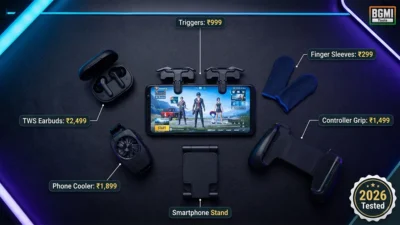
Best BGMI Gaming Accessories 2026: Triggers, Buds & More
Best BGMI mobile accessories in India for 2026. Tested triggers, low-latency earbuds, controller grips, phone coolers & finger sleeves. Budget picks inside.
BGMI All Guns List 2026 – Damage, DPS & Best Attachments
Complete BGMI weapon stats for 2026. AR, SMG, sniper, DMR, LMG & shotgun damage, DPS, TTK, best attachments, and tier rankings. Plus…

BGMI Map Guide 2026: Erangel, Miramar & Sanhok Mastery
BGMI Map Guide 2026: Erangel, Miramar & Sanhok Mastery

BGMI Pro Player IDs 2026: Jonathan, Mortal, Scout, Dynamo
Verified BGMI IDs for Jonathan, Mortal, Scout, Dynamo & more top streamers. Includes in‑game setups, device details, and how to avoid fake…
BGMI Best Drop Spots 2026: All 8 Maps Hot & Safe Guide
Master every BGMI map with the best drop spots for 2026. Hot drops for high KD, safe drops for rank push. All…
BGMI Ping Optimizer 2026: Fix Lag & Reduce Ping
BGMI ping optimizer, BGMI fix lag, reduce ping BGMI, BGMI high ping solution, BGMI best server settings, BGMI ping 20ms, BGMI lag…
Frequently Asked Questions
What is the best sensitivity for 3-finger claw without gyroscope in BGMI?
Start with red dot ADS at 55-65%, camera sensitivity at 130-150% (TPP no scope), and 2x ADS at 40-50%. These values balance close-range snap speed with mid-range spray control. Import code 7128-4471-2299-3401 as a starting point, then tune each scope by 3-5% in Training Grounds based on your weapon preferences .
Why do most 3-finger sensitivity guides show gyroscope settings?
Because the top-ranking pages for this query cover pro players like Jonathan who use full gyroscope at 300% sensitivity . These pages rank highly because of their domain authority and pro-player brand recognition, not because they serve the “no gyro” search intent. A dedicated non-gyro 3-finger guide didn’t exist — until this page.
Can I copy Jonathan’s sensitivity settings for 3-finger claw?
You can, but it won’t work the same way. Jonathan uses extremely high gyroscope sensitivity (300% on most scopes) . If you disable gyroscope, his ADS values become your primary recoil control — and they’re calibrated for a player who supplements them with aggressive phone tilting. Without gyro, you’ll need higher ADS values than Jonathan’s 88% on red dot .
Should I increase or decrease ADS sensitivity for 7.62mm weapons?
Increase ADS sensitivity slightly (5-8%) for 7.62mm weapons like the AKM and Beryl M762. The 4.2 update increased their base damage but their recoil is stronger than 5.56mm ARs. Higher ADS values help your right thumb compensate for the stronger vertical kick. Test specifically with the AKM at 20 meters in Training Grounds.
Is 3-finger claw better than 4-finger for no gyro players?
Not necessarily better — different. 3-finger is more comfortable for smaller hands and phones, and the learning curve is lower than 4-finger . But 4-finger gives you one additional point of screen contact, enabling simultaneous peek + crouch + fire. If you’re comfortable with 3-finger and your ADS values are well-tuned, you don’t need to switch.
What’s the difference between camera sensitivity and ADS sensitivity?
Camera sensitivity controls screen movement when you’re not firing — used for looking around and target acquisition. ADS sensitivity controls crosshair movement while you’re actively firing — used for recoil compensation. As a non-gyro player, your ADS values are more critical because they’re your only mechanism for controlling spray .
How do I stop my sensitivity code from expiring?
Sensitivity codes are tied to the creator’s cloud save. If they update or delete their layout, your imported settings can reset . The permanent fix: Screenshot every sensitivity page immediately after importing a code. Save these screenshots to a dedicated folder. If the code ever expires, you can manually re-enter your values from the screenshots.